
- Home
- Suite features
- Deliverables and exports
Deliverables you can check, DRAFT until a lawyer has reviewed them
A compliance deliverables export from the Regingada Compliance Suite is a file you can open and check: an obligation applicability statement (HTML and CSV) with rows for seven regimes, an orientation pack for counsel (HTML and JSON), and JSON snapshots from the GDPR, AI Act and DSA cockpits, the suite's per-regime workspaces. Your browser builds each file; none is a finished legal document.
- OAS · HTML + CSV
- Orientation pack · HTML + JSON
- Cockpit JSON · GDPR · AI Act · DSA
- DOCX · not in the browser edition
- FINAL · law firm only
What does the compliance deliverables export contain?
Files, not verdicts. The export turns your quick-check and cockpit answers into documents colleagues or outside counsel can read without the suite: which obligations your answers point to and which stay open, your profile with its evidence list, and single cockpits' working data. Each file is a DRAFT: the OAS applies rule-based triggers, the others record what you entered. None assesses your case.
For a US company the need usually arises when EU counsel asks what you already know: one CSV row per obligation hands them your facts and open questions, and the Trust Center explains why none of it is FINAL.
From the first click to the first file
Open /suite/#mandanten. Then:
- Confirm the legal notice. First visit only: tick the acknowledgement box under 'Legal Notice & Disclaimer (Step 1: Orientation)', then click 'Accept & Continue'.
- Pick DSA, AI Act or GDPR on the welcome screen. Only these open a quick check that saves a profile; DMA, NIS2 and Cross-regulation open views without one, the Data Act card does not respond, and PIPL has no card.
- Complete the quick check, ending with 'Save profile ✓'. For facts you do not know, pick the option starting 'Unsure'; the files show them as open. Closing the dialog (×, Esc, outside click) returns you to Home; the regime's sidebar item reopens it.
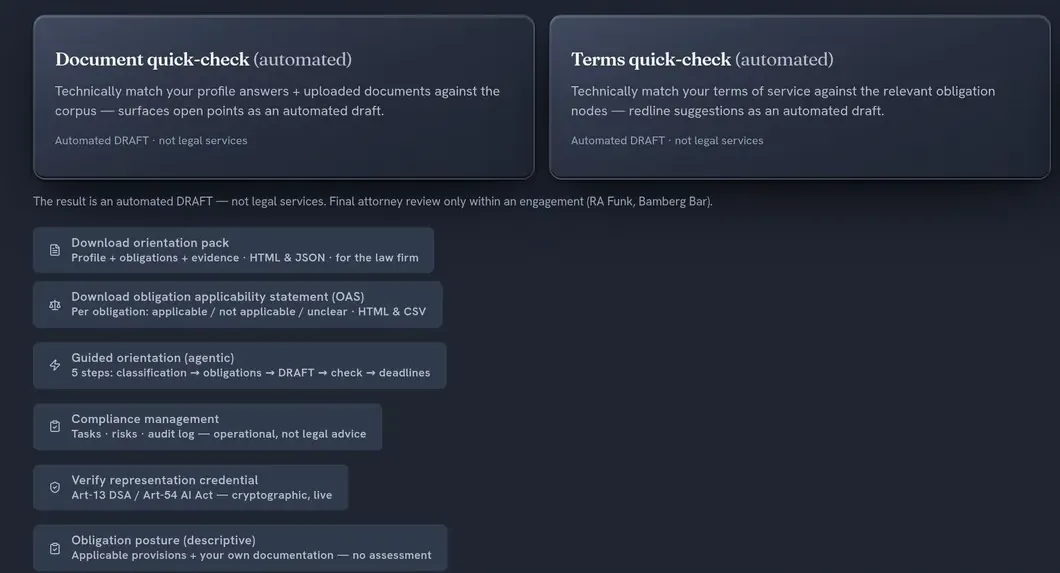
- Click 'Client Workflow' in the sidebar. 'Download orientation pack' and 'Download obligation applicability statement (OAS)' sit below the workflow hub; the audit log is under 'Compliance management'.
- Collect module files in the cockpits. In the GDPR, AI Act or DSA cockpit, click the sidebar item; each has a condition. 'DPIA Risk-Assessment', 'DPIA Records', 'DPIA AVV' (data protection impact assessment; AVV: data processing agreement): 'Yes' or 'Unsure' on special categories or automated decisions, or a DPIA trigger in the 'Processing Inventory'. 'Art. 13 Transparency': a high-risk AI system you provide. 'Risk Assessment (Art. 34)': a very large online platform or search engine (VLOP/VLOSE, Art. 33 DSA).
Which files can you export, and in which format?
Eight deliverables, all built in your browser: the compliance deliverables export in Client Workflow (OAS, orientation pack, audit log) and five cockpit JSON files. No Word or PDF export, and no file is signed.
| Deliverable | Content or articles referenced | Output |
|---|---|---|
| Obligation applicability statement | Registers: AI Act, GDPR, DSA, DMA, NIS2, Data Act, PIPL | regingada-oas-<date>.html + .csv |
| Orientation pack | Quick-check answers, evidence list; disclaimer citing §§ 2, 3 RDG (German Legal Services Act) | regingada-orientation-<date>.html + .json |
| Audit log | Log entries, no article | regingada-audit-<date>.json or .csv |
| DPIA risk factors | Art. 35(1) and (3) GDPR, EDPB-endorsed WP248 criteria | gdpr-dpia-risk-assessment-<date>.json |
| DPIA records | Fields labelled Art. 30(1)(a)–(g) GDPR (controller record; Art. 30(2) not modelled) | gdpr-dpia-records-<date>.json |
| Processor-clause matrix | Art. 28(3) GDPR; transfer SCC modules 1–4, Commission Implementing Decision (EU) 2021/914 | gdpr-dpia-avv-<date>.json |
| Instructions-for-use fields | Art. 13(3) AI Act | aiact-annexiv-transparency-<date>.json |
| Systemic risk assessment | Art. 34(1) DSA | vlop-risk-assessment-<date>.json |
The applicability statement
Per obligation: article, assessment, a reasoning line naming the profile values tested, and a source anchor, often a CELEX number (EUR-Lex's document identifier). 'Unclear' means no data for the regime, a check that could not run, or an unsure answer that changes the result. The CSV escapes cells starting with =, +, - or @ against formula execution.
The orientation pack for counsel
Titled 'Orientation summary (DRAFT)'. Per filled regime: your answers under internal field names, then your local evidence vault's files by name and mapped obligation, not the files themselves. The JSON mirrors it.
One hypothetical company, its files
Take Company H from the EU compliance self-assessment page, a hypothetical US hiring-software provider with no EU office. AI Act: provider, outside the EU, 'Annex III high-risk area', 'Chatbot / human-AI interaction'. GDPR: personal data yes; special categories and automated decisions unsure; outside the EU with EU-market processing; consent no. DSA: open.
- OAS · GDPRRows turning on the two unsure answers, Art. 9 and Art. 22 GDPR among them, read unclear and name both open questions. The Art. 27 GDPR row reads applicable because the establishment answer fires its trigger; it tests neither Art. 3(2) GDPR nor the Art. 27(2) exemption. Rows for the other five regimes read 'No data on file'.
- OAS · AI ActHigh-risk provider rows read applicable, among them 'Art. 22 / 54 · Authorised Representative (non-EU)'. The OAS gives no dates: for a high-risk system, Art. 22 AI Act applies from 2 December 2027 (Annex III) or 2 August 2028 (Annex I) under Regulation (EU) 2026/1744 — see the AI Act authorised representative service.
- Orientation packAnswers appear as stored, e.g. art9_status: unsicher — German even in the English interface.
- Cockpit JSON'Art. 13 Transparency' exports the instructions-for-use fields. For the DPIA gate the suite treats 'Unsure' like 'Yes', so the three DPIA sections offer their DPIA export JSON at once; whether a DPIA is required stays for counsel.
The detail behind the rows: the obligations register, DPIA tool and Annex IV documentation pages.
The limits, stated plainly
- The orientation pack has no obligations section, despite its sub-line 'Profile + obligations + evidence'. Send the OAS with it.
- 'Applicable' and 'not applicable' mean only that a trigger did or did not fire for the profile as entered — not that the obligation binds you or cannot reach you, nor from when (see the AI Act timeline).
- Only the DSA, AI Act and GDPR quick checks feed the OAS. DMA, NIS2, Data Act and PIPL rows read 'No data on file' until their cockpit portfolios hold entries.
- After 'no personal data' in the GDPR quick check, the GDPR cockpit lists no duties, yet the OAS still marks GDPR's general rows applicable. Treat them as questions.
- Cockpit JSON files are raw snapshots without disclaimer or DRAFT label, and none is the compliance documentation EU law requires.
- The German-only, watermarked template previews (DSA Art. 34/35 assessment, Annex IV file) cannot be downloaded. The DSA one needs a VLOP or VLOSE archetype (social network, marketplace, search engine, video sharing), the Annex IV one a high-risk AI system plus a DSA service in one of those sectors.
- Files come from this browser's storage; elsewhere every row reads unclear. The audit log holds up to 500 log entries, not tasks or risks.
Frequently asked questions
What is an obligation applicability statement?
A structured self-assessment with one row per obligation across seven registers: AI Act, GDPR, DSA, DMA, NIS2, Data Act and PIPL. Each row reads applicable, not applicable or unclear, with a reasoning line and a source anchor. Rule-based triggers produce the verdicts; DSA, AI Act and GDPR rows draw on your quick check, the other four on entries in their cockpits.
Why is the output a DRAFT?
Because software output is orientation, not a legal service within the meaning of § 2(1) of the German Legal Services Act (RDG). The orientation summary is titled DRAFT and the OAS calls itself a self-assessment; the cockpit JSON files carry no label, so mark them before forwarding. FINAL exists only after a lawyer at the law firm Theo Funk has reviewed the matter under a separate mandate (Trust Center).
Can the suite produce a finished DPIA or Annex IV file?
No. The GDPR and AI Act cockpits export DPIA working data and the Art. 13(3) instructions-for-use fields as JSON: inputs, not the assessment Art. 35(7) GDPR requires or the technical documentation of Art. 11 and Annex IV AI Act. The law firm Theo Funk can help draw them up under a separate mandate; the DPIA remains the controller's (Art. 35(1) GDPR), the documentation the provider's (Art. 11(1) AI Act).
Can I get a Word (DOCX) report?
No, not in the browser edition. Four cockpits show a DOCX compliance report export button, but it calls a deep-analysis engine the browser edition does not include and stops with 'Deep-analysis engine not connected'. HTML, CSV and JSON work today. Written reports on firm letterhead are law-firm work under a separate mandate.
Is anything sent to the law firm automatically?
No. Downloads are built in your browser; no copy goes to Regingada or the firm. 'Request engagement ↗' opens a pre-filled German e-mail with your AI Act or GDPR quick-check answers in your own mail program, and nothing leaves until you press send. The 'Document quick-check' and 'Terms quick-check' cards are not exports: they are built to upload files, after you tick a consent box (Trust Center).
Open rows, not closed questions
The files show counsel what is open; they cannot settle it. Do applicant data carry special-category signals under Art. 9 GDPR? Is a ranking a decision under Art. 22 GDPR? What must a DPIA record under Art. 35(7) GDPR? The law firm Theo Funk can take the unclear rows under a separate mandate; forwarding a DRAFT does not make it FINAL.
An 'applicable' Art. 27 GDPR row is a DRAFT too. Whether a vendor serving EU employers falls under Art. 3(2) GDPR at all, and whether Art. 27(2) exempts it, the law firm Theo Funk can assess under a separate mandate. Where the duty exists, Regingada UG (haftungsbeschränkt) can be designated in writing as your representative under Art. 27(1) GDPR — a named role under its own contract, not legal advice. Use the GDPR Article 27 representative service for it, not the suite's 'Art. 27 EU-representative mandate' card; see also the representative fees.