
- Home
- Suite features
- Mandate Mark
Mandate Mark: an EU representation credential you can check yourself
To verify an EU representative appointment, the Mandate Mark checks a signed representation credential in your browser — signature, validity dates, revocation status — for roles under Art. 13 of the Digital Services Act (DSA) and Art. 54 of the EU AI Act. It runs with demonstration credentials only; credentials for live appointments are not issued yet.
- DSA · Art. 13 legal representative
- AI Act · Art. 54 general-purpose AI representative
- Live appointments · not issued yet
- GDPR Art. 27 · not covered
How do you verify an EU representative appointment today?
Mostly on paper. EU representative verification still means reading the contact details a service publishes under Art. 13(4) DSA, a name in a privacy notice, or a written mandate, if the provider shares one. None tells you, at the moment you look, whether the designation is authentic and still in force. The Mandate Mark is built for that question.
Three kinds of reader ask it. An EU company building on a US general-purpose AI (GPAI) model wants its supplier file to name the provider's Art. 54 AI Act representative. A platform's users rely on contact details that Art. 13(4) DSA requires to be accurate and kept up to date. The represented company wants to show its own.
Appointments also end: under Art. 54(5) AI Act a representative must terminate the mandate if it has reason to consider the provider in breach of its obligations, and inform the AI Office, the Commission's supervisor for GPAI models. A PDF from last year cannot show that; a revocation status can, once recorded.
From the first click to a result
Open /suite/#mandanten. Then:
- Confirm the legal notice. First visit only: tick the box under 'Legal Notice & Disclaimer (Step 1: Orientation)', then 'Accept & Continue'.
- If the welcome screen appears, pick a card. DMA, NIS2 or Cross-Regulation lead on; the Data Act card does not respond. DSA, AI Act and GDPR open a quick check that locks the sidebar: finish it, or close it with × or Esc to reach Home.
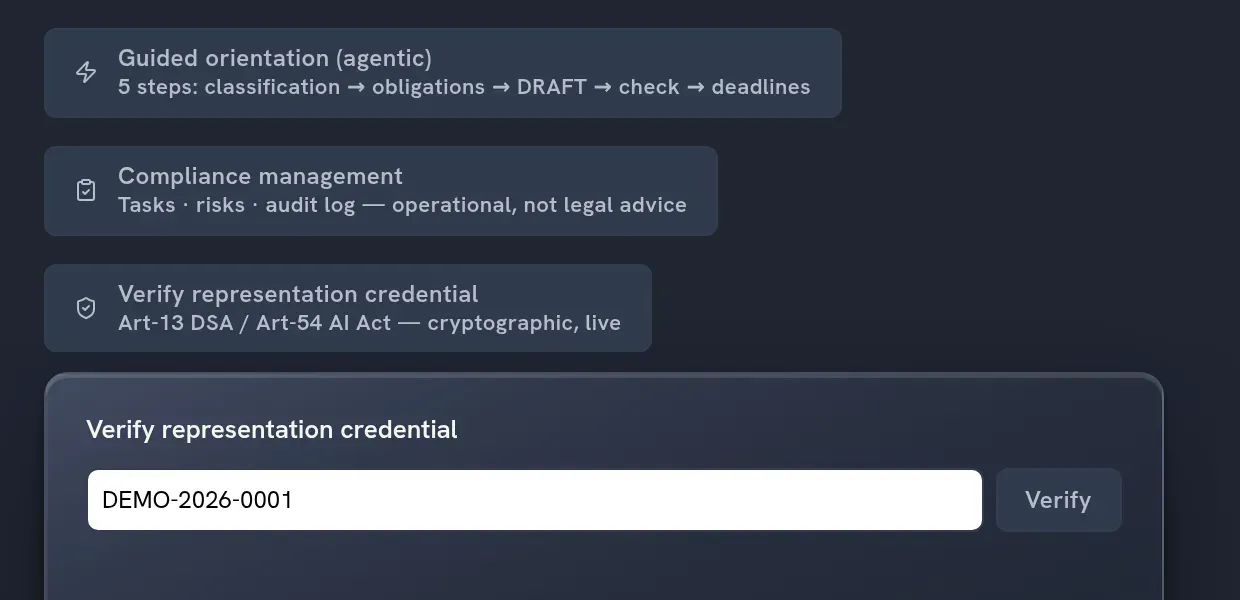
- Click 'Client Workflow' in the sidebar or on Home. Below 'Compliance management', click 'Verify representation credential'; the panel has no deep link of its own.
- Enter the credential ID and click 'Verify'. Demonstration IDs follow the placeholder 'e.g. DEMO-2026-0001'.
- Read the heading first: '✓ Valid representation', '⨯ Revoked', '⨯ Expired' or '⨯ Not verifiable', details below. An unknown ID returns 'No credential found for this ID.'; an unreachable or failing service, 'Verification error' plus the browser's message.
Behind the click, a status reply alone never produces 'valid'. Your browser fetches the published key (a did:web document) and the signed credential, verifies the Ed25519 signature itself with Web Crypto, checks the dates against your device clock, and only then requests the revocation status. Key, credential and status come from one address fixed in the suite's code; the check is as trustworthy as that service and whoever controls it.
Who signs? The panel's note calls the credential 'lawyer-issued', checked against 'the firm's public key'. For now the key comes from what the code marks as a demonstration and test instance, and the 'Issuer' line shows whatever name and bar membership the signed credential states; the panel does not match them against the key. Where Regingada is appointed, the representative role sits with Regingada UG (haftungsbeschränkt), not with the law firm.
Three checks, four headings, one screen
| Capability | Related provision | Output |
|---|---|---|
| Signature · Ed25519 | Art. 13(1) DSA, Art. 54(1) AI Act: the written designation it points to | On failure '⨯ Not verifiable' · 'Signature invalid or not checkable in this browser.' |
| Validity window | Art. 13(4) DSA: details kept accurate and up to date | '⨯ Expired', or '⨯ Not verifiable' · 'Not yet valid.' |
| Revocation status · fail-closed | Art. 54(5) AI Act: termination of the mandate | '⨯ Revoked', or '⨯ Not verifiable' · 'Status unreachable — cannot be shown as valid.' |
| Credential details | Art. 13(2) DSA, Art. 54(4) AI Act: who authorities may address | Entity, jurisdiction, regime, scope, issuer, validity ('open-ended' without end date), UTC time of check — displayed, not assessed |
Neither act provides for credentials: the middle column names related provisions, not a legal basis, and a passed check satisfies none of them.
What leaves your browser
Up to three GET requests to the status-service address, a host outside regingada.com: key, credential, status. The ID you typed travels in the last two; like any web request, each carries your IP address and browser metadata. Nothing from your profile is sent. The rest of the suite's data handling is in the Trust Center.
A procurement check against a fictional GPAI provider
Take DeepHelm AI, the fictional demo profile of a general-purpose AI provider without an EU establishment. A Munich software company wants to build on its model, and procurement asks for proof of the EU representative appointment under Art. 54 AI Act. No DeepHelm credential exists; read this as what the panel would do.
- OnboardingAll checks pass: '✓ Valid representation', with entity, regime, scope, issuer, open-ended validity and the 'Last checked' time.
- Month sevenThe same ID reads '⨯ Revoked', without a reason. Procurement asks DeepHelm who represents it now; whether the model may stay in use is for the Munich company's own counsel.
- Same dayA colleague whose network blocks the status service sees only 'Verification error' and a browser message: not even the key loaded. A failed check, not a finding about DeepHelm.
The model case names three appointments — Art. 54 AI Act, Art. 13 DSA, Art. 27 GDPR; the panel's label covers the first two. The cross-regulation tour sets all three side by side.
The limits, stated plainly
- Demonstration credentials only. Until live credentials exist, a 'Valid representation' is not AI Act authorised representative proof for any company.
- Verify only. Issuing, renewing and revoking credentials sits with the issuer, not the suite.
- Shows, does not judge. Regime and scope are not tested against Art. 13 DSA or Art. 54 AI Act, nor is the representative's Member State (Art. 13(1) DSA).
- Unverified fields stay visible. Where the signature fails, the panel still lists what the credential claims, under '⨯ Not verifiable'.
- Your device has a say. A wrong clock can make a current credential 'Expired' or 'Not yet valid'; a browser without Ed25519 support shows '⨯ Not verifiable' for every credential.
- No record. Nothing is stored or exported; capture the screen if your file needs evidence.
- No key-custody statement. Neither this page nor the Trust Center says how the signing key is held.
Frequently asked questions
How can I verify that a company has appointed an EU representative?
Start with what the law makes public: the DSA legal representative's name, postal address, email address and telephone number (Art. 13(4) DSA), and the representative named in a GDPR privacy notice (Art. 13(1)(a), Art. 14(1)(a) GDPR). The AI Act does not require the Art. 54 mandate to be published; the AI Office gets a copy on request (Art. 54(3) AI Act), so ask the provider. A Mandate Mark adds a signed credential, so far for demonstration only.
What is a Mandate Mark?
A Mandate Mark is a verifiable credential for a legal or authorised representative: a signed statement that a named entity is represented in the Union under Art. 13 DSA or Art. 54 AI Act, plus the suite's check of it. It is a JSON Web Token signed with Ed25519; the public key is a did:web document at the status-service address.
What does the verifier check?
Three things, in order: the Ed25519 signature, the validity window against your device clock, and the revocation status when you click. Only if all three pass does the panel show 'Valid representation'. Whether regime or scope fits the represented company is not checked; that is a legal question.
Can a revoked or expired appointment still show as valid?
Not once the issuer has recorded it, if your device clock is right. A passed end date gives 'Expired' before the status is requested; a revocation entry gives 'Revoked'; a failed status request gives 'Not verifiable'; an unreachable service gives 'Verification error'. None reads 'valid'. The limit lies upstream: an appointment ended without a revocation entry still reads as current.
Is the Mandate Mark live for real appointments?
No. The status service runs with demonstration credentials only, and credentials for live appointments are not issued yet. 'Live' on the suite button means that each check queries the status service when you click, not that real mandates stand behind it.
Does the Mandate Mark replace the public designation the law requires?
No. The statutory steps stay: written designation (Art. 13(1) DSA, Art. 54(1) AI Act), notification to the Digital Services Coordinator — the national DSA regulator — and public contact details (Art. 13(4) DSA), and the mandate copy for the AI Office on request (Art. 54(3) AI Act). A credential points to an appointment; it does not make one, and neither act refers to credentials.
A valid signature is not a valid mandate
When you verify an EU representative appointment here, the panel answers one narrow question: is this credential authentic and current according to its issuer? For DSA legal representative verification it confirms a signature, not a legal position. Whether your service is an intermediary service, your model a general-purpose AI model, or a representative's scope covers Art. 54(3) AI Act, it does not decide. Its own footnote: 'Verification, not legal advice.'
If you need a representative yourself, Regingada UG (haftungsbeschränkt) holds appointed roles as legal representative under Art. 13 DSA and authorised representative under Art. 54 AI Act; the overview of representative services covers other regimes. Whether you need an appointment, and whether its scope fits, is for the law firm Theo Funk under a separate mandate, subject to its conflict check: how an EU representative is appointed. Another company's appointment is for your own counsel.