
- Home
- Suite features
- Obligations register
An obligations register that knows where each duty comes from
A compliance obligations register records which legal duties apply to you, from which article, and what work each one needs. The Regingada suite keeps one per regime, in a view it calls a cockpit — AI Act, GDPR, DSA, DMA, NIS2, Data Act, PIPL — and lists only the obligations your profile triggers. It is a draft to reconcile, not a legal finding.
- 153 register entries · 7 registers
- Due dates per obligation · not modelled
- Evidence behind a tick · not checked
What belongs in a compliance obligations register?
One row per duty, with five facts on each: the duty, its source down to the article, whether it applies to you and why, the work it creates, and how far that work has got. An obligations register template covers the first two; applicability is where a register becomes specific to one company.
For a US company the rows can come from several acts at once: the AI Act for an AI system on the EU market, the GDPR where you offer goods or services to people in the EU or monitor their behaviour there (Art. 3(2) GDPR), the DSA for an intermediary service offered in the EU. With no EU establishment, some add an appointment duty on their own conditions. A generic EU compliance checklist cannot know your profile.
In the suite a row is on your list because a trigger rule fired on your profile. Internal hours are a separate question: the EU exposure estimate gives a range from an open model.
How do you build the register, step by step?
Open /suite/#ai-act. Then:
- Get past the legal notice. A first visit opens 'Legal Notice & Disclaimer (Step 1: Orientation)'; tick 'I have read and understood…', then 'Accept & Continue'.
- Choose a regime on the welcome screen. The AI Act, GDPR and DSA cards open a quick check; DMA and NIS2 start from a portfolio of services or entities; Data Act and PIPL open from the sidebar (the Data Act card does nothing).
- Answer the quick check. For the AI Act: role, establishment, AI-system types. 'Unsure' is accepted: the cockpit fills in a default, and the statement marks the rows that depend on it 'unclear'.
- Click 'Obligations' in the cockpit's sidebar. The register has no URL of its own; the sidebar item scrolls to it.
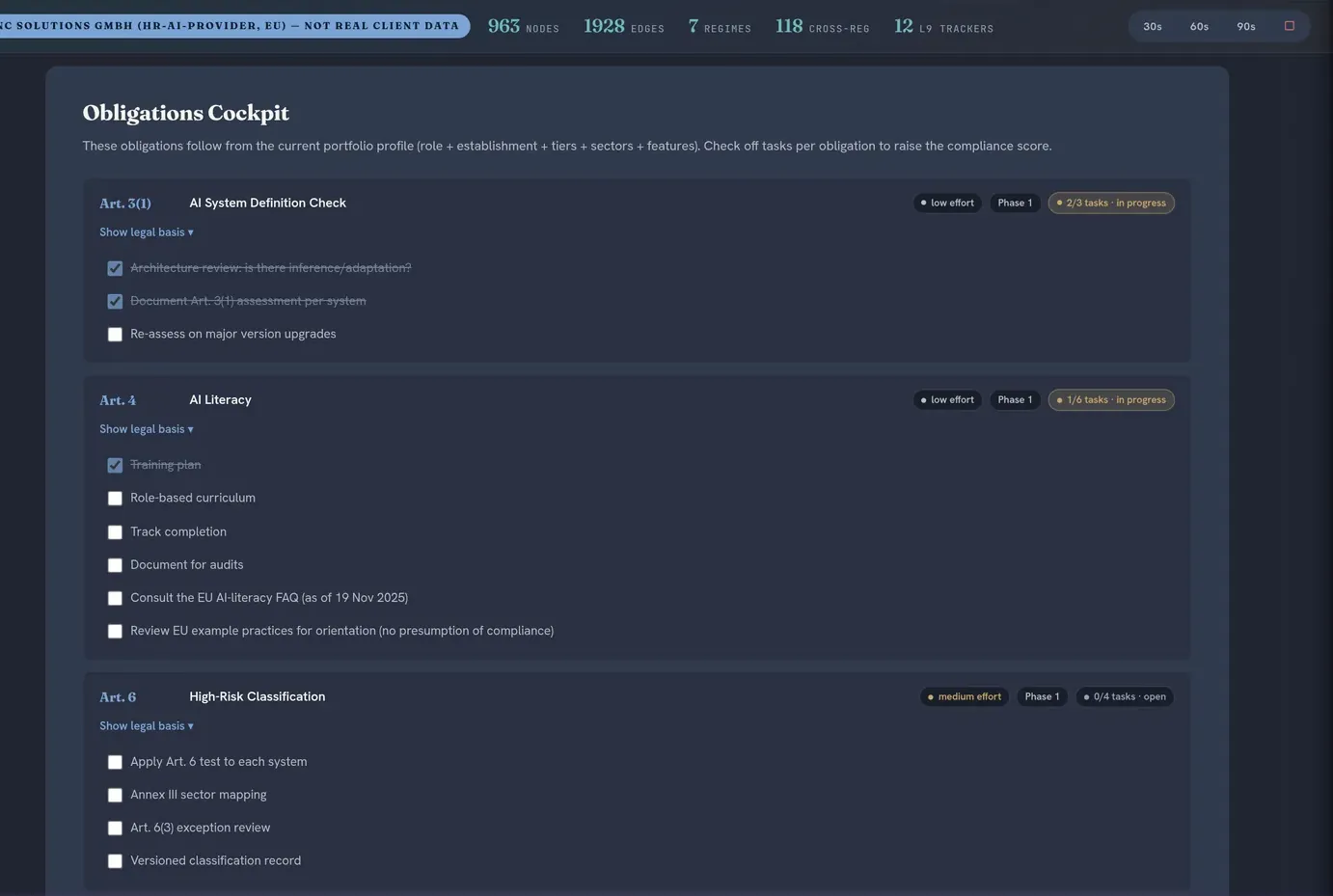
- Work the cards. 'Show legal basis' opens the summary; ticks move a card from open to in progress to fulfilled.
- Download the statement. Sidebar item 'Client Workflow' (/suite/#mandanten), then 'Download obligation applicability statement (OAS)'.
Seven registers, one statement
Each cockpit shows its slice of the compliance obligations register; the statement lists all seven as one regulatory obligations inventory. Reconcile its DMA, NIS2 and GDPR rows with the cockpits (see the limits).
| Register | Legal basis | Entries |
|---|---|---|
| AI Act | Regulation (EU) 2024/1689, Art. 3(1) to Art. 111 | 38 |
| GDPR | Regulation (EU) 2016/679, Art. 5 to Art. 49; §§ 26, 29 of the German Federal Data Protection Act (BDSG) | 21 |
| DSA | Regulation (EU) 2022/2065 (Digital Services Act), Art. 4 to Art. 49; § 12 of the German DDG | 32, by service tier |
| DMA | Regulation (EU) 2022/1925 (Digital Markets Act) | 7, designated gatekeepers only |
| NIS2 | Directive (EU) 2022/2555 (network and information security) | 7, essential or important entities |
| Data Act | Regulation (EU) 2023/2854 | 23, by actor role |
| PIPL | China's Personal Information Protection Law | 25, by role and processing flag |
| Statement (OAS) | All seven registers, HTML + CSV | 153 rows |
A card per obligation
In the AI Act and GDPR cockpits: article, title, an effort badge from 'low effort' to 'critical', a 'Phase 1' to 'Phase 4' badge, tickable tasks and a counter such as '2/4 tasks · in progress'.
A statement per profile
The obligation applicability statement runs every trigger against your stored profile and labels each row 'applicable', 'not applicable' or 'unclear', with reasoning and, where one exists, a CELEX anchor (the EUR-Lex document number). It is headed 'structured self-assessment': a draft, not legal advice. Formats: deliverables and export formats.
Compliance management, beside the register
Client Workflow also holds a compliance task tracker you fill in by hand (owner, due date, status), a risk register and an audit log, exportable as JSON or CSV, of changes made there, not of cockpit ticks.
Answers and ticks sit in local browser storage, with no account; only a submission you trigger sends them out (Trust Center).
What does the register list for a general-purpose AI provider outside the EU?
For DeepHelm AI, the fictional model provider of the model cases, the AI Act cockpit shows nine cards and no high-risk block. The answers: provider, established outside the EU, a general-purpose AI (GPAI) model and one trained with more than 10²⁵ FLOPs, where Art. 51(2) presumes high-impact capabilities.
Three fire for every profile: Art. 3(1), the AI-system definition check; Art. 4, AI literacy; Art. 85, complaints to authorities. Four follow from the model: Art. 53 ('high effort'), Art. 55 on systemic risk ('critical'), Art. 111 on transition and the representative card. Art. 89(2), downstream complaints, and Art. 101, Commission fines, complete the nine; like Art. 85, they are context, not your duties.
The representative card, headed 'Art. 22 / 54', fires on 'outside the EU' plus a high-risk system or a general-purpose model. Here the operative part is Art. 54, applicable since 2 August 2025 (models on the market before then: by 2 August 2027, Art. 111(3)); Art. 22 covers high-risk systems from 2 December 2027 (Annex III) and 2 August 2028 (Annex I) under Regulation (EU) 2026/1744.
Now rerun the quick check with the establishment 'Unsure', which takes 'Delete profile' first (see the limits). The cockpit reads the profile as EU-established and drops the representative card. The statement re-runs that trigger for both establishments, sees the result flip and marks the row 'unclear', naming 'Where is your company established?'.
DeepHelm AI is a synthetic demo profile, not a client; the same answers reproduce it.
Where the register is thinner than it looks
- Ticks in two cockpits only. The DSA, DMA, NIS2, Data Act and PIPL registers show their tasks as plain lists.
- The statement and three cockpits can disagree. For DMA and NIS2 it does not read the tier the cockpit uses, so a gatekeeper's or an essential or important entity's rows read 'not applicable' while the cockpit lists them; a GDPR profile answered 'No — no personal data' empties the cockpit but keeps 'applicable' baseline rows in the file.
- Answers are not edited one at a time. 'Edit profile' only reopens the welcome screen; a finished quick check reruns only after 'Delete profile', which also clears every portfolio, your ticks and the Compliance management data. Systems added by hand in 'AI Portfolio' reach the Obligations list after a view switch.
- Not every article has a row. The DSA register lacks Art. 18 (suspected offences), Art. 41 (compliance function) and Art. 43 (supervisory fee).
- No NIS2 representative line. The register covers registration (Art. 27 read with Art. 26 NIS2), not the representative that listed non-EU digital providers must designate under Art. 26(3) NIS2 as transposed nationally — see the NIS2 representative page.
Frequently asked questions
Is there a template for an EU digital law obligations register?
Not a blank one: the suite assesses its rows against your answers instead. The statement's CSV can serve as a starting template: one row per register entry across all seven registers, with the columns Regime, id, Article, Obligation, Assessment, Reasoning, Source anchor and url. Add owners and due dates in the Compliance management panel, evidence in your own sheet.
How does the suite decide which obligations apply to me?
It does not decide; it runs rules. Each obligation carries a trigger that reads your profile — role, establishment, risk tier, sector, characteristics or service tier — and the card appears when it fires. The rules are deterministic, with no AI model: same answers, same list.
Can I export the register?
Yes, as a statement rather than a copy of the cockpits. In Client Workflow, 'Download obligation applicability statement (OAS)' saves an HTML file and a CSV covering all seven registers; task ticks are not in the file. Other downloads: deliverables and export formats.
What does 'unclear' mean in the applicability statement?
It means the software declines to choose for you. A row is unclear when the regime has no data on file, when its rule cannot be evaluated, or when an open answer — 'Unsure', 'Unknown' or 'Other role' — would flip the result. The reasoning column names that question: these rows are the agenda for counsel.
Does ticking every task make us compliant?
No. A card switches to 'fulfilled' when every task on it is ticked, and that is all the status measures: your own ticks, stored in your browser. Nothing checks the documents or controls behind a tick, and the task list is a starting set, not the full content of the duty. The cockpit's intro mentions a 'compliance score'; none is shown.
A trigger that fires is not a duty that binds
A compliance obligations register can show which rules fire for your answers. It cannot tell whether those answers describe your company correctly, whether an exception takes a row out — Art. 27(2)(a) GDPR, whose cumulative conditions a live online service rarely meets, is one example — or what a duty takes in your setup. The law firm Theo Funk can assess those questions, starting with the 'unclear' rows, under a separate mandate.
Where an appointment duty is confirmed — Art. 27 GDPR, Art. 13 DSA, Art. 54 AI Act, Art. 37(11) Data Act — Regingada UG (haftungsbeschränkt), which builds the software and is not a law firm, can take on that appointment under its own contract: EU representative for US companies. It is separate from any law-firm mandate, neither requires the other, and the fees are in the price list.